Skip to content
Available on Android, iOS & Desktop now.

Your Nikon Z8 App & Full Pro Guide β€” right in your pocket.

The complete Nikon Z8 app for iOS, Android & Desktop with every button, every menu and every fix in your pocket. This is the ultimate Nikon Z8 app for photography. Built by an award-winning professional photographer who shoots with this camera every day.


$15.99 one-time payment Β· no subscription
Created by Kieran Hayes Β· 17,500+ YouTube Subscribers Β· 12+ years professional Β· Top 3 worldwide for Nikon Z reviews

What People Are Saying about this app

Reviews

Verified reviews from Google Play and the App Store.

β˜…β˜…β˜…β˜…β˜…
“I rarely leave app reviews β€” it has to be genuinely brilliant to earn one. It’s like having a pocket-sized photography assistant. If you’ve bought a Z8, this is an essential purchase.”
grizzlyapple β€” App Store, United Kingdom

β˜…β˜…β˜…β˜…β˜…
“This is the first time I have ever left a review of an app. I can honestly say this is the best app that I have ever used. The information contained in it is astounding. A definite six stars.”
Dmarti12 β€” App Store, United Kingdom

β˜…β˜…β˜…β˜…β˜…
“Thousands of pounds on camera equipment and an official camera guide none of us understand. Not now β€” this is absolutely superb. A complete guide on the phone in your pocket. It’s perfect.”
MBSC 1 β€” App Store, United Kingdom

β˜…β˜…β˜…β˜…β˜…
“Absolutely brilliant. If you own a Z8 then this app is essential. Kieran has included huge detail in every section. It’s very well laid out and very easy to navigate. 10/10.”
Christy McGrath, Professional Photographer β€” Google Play

β˜…β˜…β˜…β˜…β˜…
“Way better than the manual. I can quickly find what I need, and this app does have everything I need. You can tell a lot of effort went into making it. Highly recommended if you have a Z8.”
James Clark β€” Google Play

β˜…β˜…β˜…β˜…β˜…
“This is by far the best app anyone could have ever developed for the Nikon Z8. Kieran has more information than anyone else. It’s worth every penny and then some. You will not be disappointed.”
Michey Heathen β€” Google Play
7
Sections
35
Buttons Explained
5
Calculators
30+
Fixes
241
Menu Entries

The Problem

The Nikon Z8 manual has 700+ pages.
Nobody has time for that.

The Z8 is one of the most powerful cameras Nikon has ever made. But getting the most out of it means digging through a phonebook-sized manual, watching hours of YouTube videos, and trial-and-error on shoots where you can’t afford to get it wrong.

“I built the Nikon Z8 app because I felt there was a serious need for it. After years of teaching people photography I wanted to start producing products that were affordable, always with you and answered difficult questions easily. I wanted the answer a tap away not buried in a PDF or deep in a Youtube video.Β  hence me designing this app.”

β€” Kieran Hayes

Watch the Overview

See the Nikon Z8 App in Action

Watch Kieran walk through the app and show exactly what’s inside β€” every section, the instant search, cheat sheets and calculators.

Available Now

Download the Nikon Z8 Pro Guide

Live now on both Android and iOS. One-time purchase β€” no subscription, no ads, works fully offline anywhere in the world.

Also Available

Prefer to use it on your computer?

The full Z8 Pro Guide is also available as a desktop version β€” the exact same content, readable in any browser on your Mac or PC. Open it in Chrome, Safari, Firefox or any browser you prefer. It is not a downloadable app β€” it is a web-based version you log into and read in your browser, ideal for planning shoots at home, studying the menu guide in depth or running through the troubleshooting section on a big screen.

Already own the Z8 app? Open the app for an exclusive discount β€” desktop access for just $7.49 via the link inside the app.

One-time payment Β· No subscription Β· Instant access after purchase
Already have an account? Log in here β†’

$15.99 β€” One Time  Β·  No Subscription  Β·  No Ads  Β·  Works Offline

Created by Kieran Hayes

Kieran Hayes is an award-winning photographer based in Clonakilty, West Cork, Ireland. With over 12 years experience working as a professional photographer across landscape, commercial, fashion and portrait photography, Kieran has established himself as one of Ireland’s leading Nikon educators.
His YouTube channel β€” focused exclusively on Nikon Z series cameras β€” has over 15,200 subscribers and ranks in the top 3 worldwide for several Nikon camera reviews.

17,500+ YouTube Subscribers
International Award-Winning Photographer
Photography Educator
12+ Years Professional Experience
Top 3 Worldwide Nikon Reviews
Based in West Cork, Ireland

It Keeps Getting Better

Recently Added

The Z8 Pro Guide has been updated. Here’s what has been added recently β€” all included in your one-time purchase at no extra cost.

πŸ”΄
Astro Red Mode
A dedicated red-tinted display mode for astrophotography. Red light preserves your night vision when using the guide on location in the dark. Tap the red moon icon in the header to activate it.

β˜€οΈ
Light and Dark Theme
Simple switching from a dark theme for shooting in low light and a light theme for reading in bright conditions. Just tap the sun icon in the header to toggle between the two modes.

Aa
Adjustable Text Size
Make the text larger or smaller to suit how you like to read. Sometimes it can be hard reading small text on your phone β€” the solution is to just tap the Aa button in the header and choose from three sizes. Your preference is saved and remembered for the next time you open the guide.

β˜…
Notes and Favourites
Favourite any section to pin it for quick access and you can now also add your own notes to any part of the guide. Everything is saved on your device. You can also export and import your notes to transfer them between your devices β€” super handy for moving notes from your phone to your tablet or desktop version and vice versa.

What’s Inside

Seven sections. Organised the way you actually shoot.

From your first unbox through to advanced custom banks and pixel-shift workflows. Plain English. Optimised for one-handed use on a real shoot.

πŸ“·

Basics & Button Layout
First unbox steps, battery, cards, firmware, lens attachment β€” plus all 35 buttons on the Z8 explained (front, top, back) with what each one does and how to remap it.

🎯

Complete Autofocus
All AF modes, area modes, subject detection, 3D tracking, focus limiter, peaking and focus shift shooting β€” plus Kieran’s personal focus setup from real client shoots.

πŸ”§

Essential Settings
RAW vs HEIF vs JPEG, Auto ISO, VR, metering, custom i menu, burst, grid lines, histogram. Twelve years of professional decisions, distilled.

⚑

Advanced Techniques
Recall Shooting Function, Custom Banks A–D, Auto Capture, Pre-release Capture, Interval Timer, Pixel Shift. The features most Z8 owners never figure out.

New
πŸ› οΈ

30+ Z8 Problems Solved
RAW greyed out, banding stripes, focus jumping, overheating, weird shutter values, SnapBridge GPS issues, memory bank chaos. Each fix with the exact menu path.

πŸ“–

All 241 Menu Entries
The complete Z8 menu tree β€” Photo Shooting, Video, Custom Settings, Playback, Setup, Network and My Menu β€” every item explained with recommended settings.

Five Built-In Calculators

The maths is done. Just shoot.

There are five professional calculators built into my Nikon Z8 app β€” for long exposures, golden hour planning, depth of field, astrophotography and moon phases. No more switching between apps on location.

⏱️

Long Exposure
Calculate perfect shutter speeds for any ND filter combination β€” 6, 10, 15-stop and more. Essential for landscape and seascape work.

πŸŒ…

Golden Hour & Blue Hour
Plan your shoots around the best light. Sunrise, sunset, golden and blue hour times for your exact location and date.

πŸ“

Depth of Field & Hyperfocal
Nail focus from front to back. Calculate hyperfocal distance and depth of field for any focal length and aperture.

⭐

NPF Astrophotography
The modern NPF rule β€” far more accurate than the old 500 rule. Get pin-sharp stars without trails, every time.

πŸŒ™

Moon Phase
Plan moonrise and moonset shots. Know exactly when the full moon will appear, and where it will be in the sky.

Here is my list off all my Nikon Z series apps or if you are looking for my full Nikon Z6iii app I have more information on these links.

Bonus Inside

Skip the setup. Use my settings.

Download Kieran’s complete Z8 settings file β€” the exact configuration he uses on professional shoots β€” and load it straight onto your camera. Pre-configured custom banks A, B, C and D included.

Included with purchase
My Pre-Configured Z8 Banks

Hours of menu-tweaking, replaced by a single import. Backup your own settings first, load mine, and you’re shoot-ready in under two minutes.
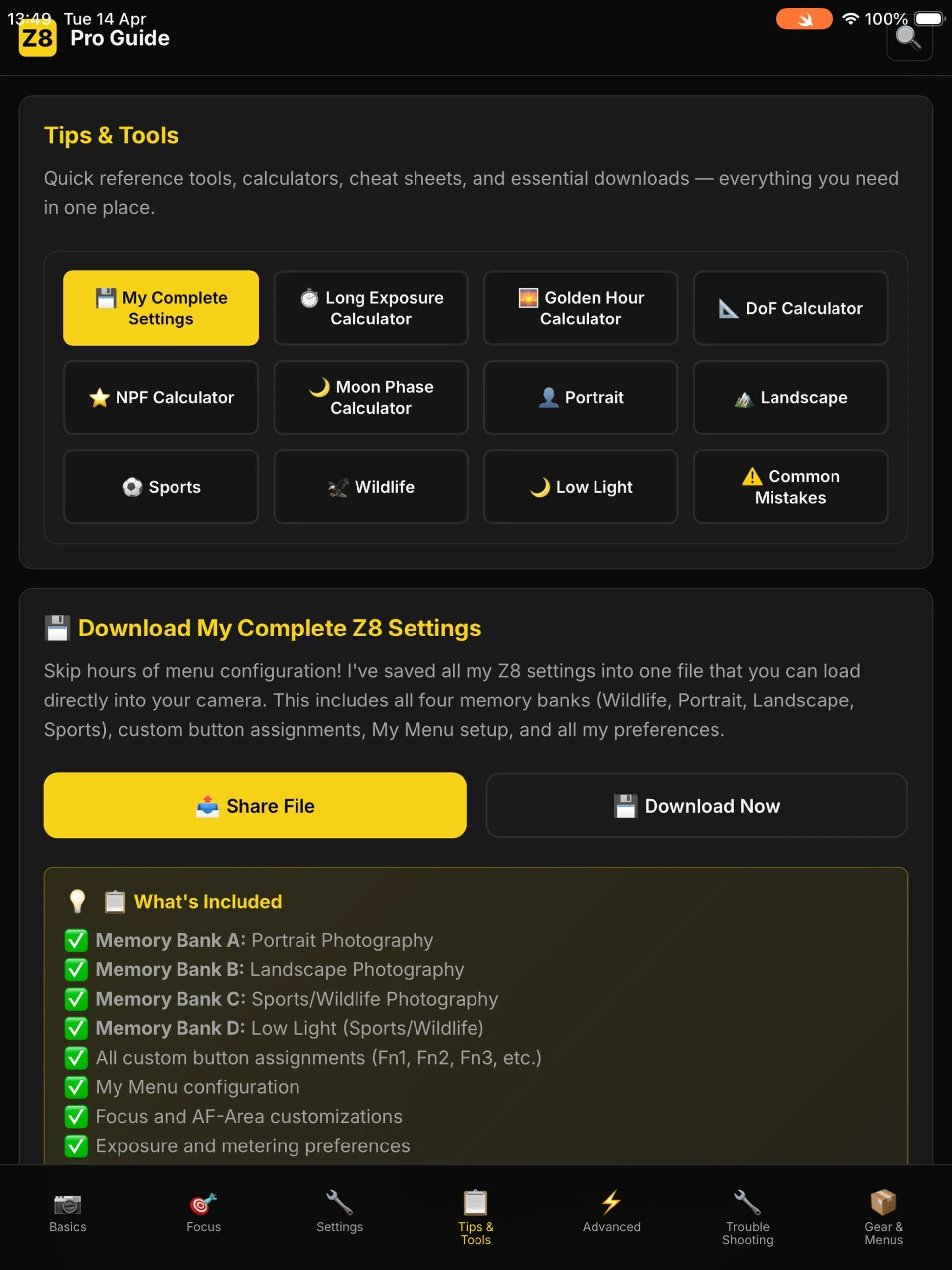
Nikon Z8 Pro Guide app screenshot

Cheat Sheets

The settings Kieran actually uses on professional shoots.

Quick-reference cards for every shooting scenario. Real focal lengths, real apertures, real lens recommendations.

πŸ‘€

Portrait
Focal lengths, apertures, Eye AF, flash

πŸŒ…

Landscape
Aperture, IBIS, tripod technique

πŸƒ

Sports
AF-C, shutter speeds, burst, cards

πŸ¦…

Wildlife
Subject detection, BIF, 3D tracking

πŸŒ™

Low Light
Auto ISO ceilings, flash TTL

Field-Tested Fixes

When something breaks at 11pm before a shoot β€” this is the app you’ll open.

Every problem with a step-by-step fix and the exact menu path. No forum-trawling. No “have you tried turning it off and on?”

πŸ“· RAW Option Greyed Out
πŸ“Ί Banding / Horizontal Stripes
🌑️ Overheating During Video
🚫 Shutter Won’t Fire
πŸ”‹ Battery Draining Too Fast
πŸ‘† Focus Point Jumping On Its Own
πŸ“± SnapBridge GPS Not Tagging
πŸ’Ύ Memory Banks Changing Unexpectedly
πŸ–₯️ RAW Files Won’t Open on Mac/Win
❄️ Camera Freezes / Unresponsive
πŸ”’ Strange Shutter Values (1/197)
πŸ“Έ Burst Mode Only Takes One Shot
+ 18 more Β· 30 fixes total

Built for Real Shoots

Every feature you need.

Built by a working professional photographer β€” not a tech company.

πŸ“‘

Fully Offline
No internet needed. Works on a remote beach, in the mountains, on a plane. Once installed it never needs signal again.

πŸ”

Instant Search
Type any setting, button or topic β€” results highlight in gold so you can spot them in a second.

✍️

Plain English
Every setting written the way Kieran teaches it in workshops. Zero jargon, zero filler.

πŸ’°

One-Time Purchase
$15.99 and it’s yours. No subscription, no monthly fee, no upgrade-or-lose-it nonsense.

πŸ”„

Firmware Updates
As Nikon ships new firmware, the app’s menu tree and recommendations are updated to match.

⚠️

Common Mistakes Guide
The errors that catch even experienced shooters β€” explained, so you avoid them before they cost you a shot.
Kieran Hayes

The Maker

Kieran Hayes

Award-winning photographer based in Clonakilty, West Cork and one of Ireland’s leading Nikon educators.

Twelve years working professionally across landscape, commercial, fashion and portrait photography. His YouTube channel focuses exclusively on the Nikon Z series and ranks in the top three worldwide for several Nikon camera reviews.

This app is the reference Kieran wished existed when he first picked up the Z8. So he built it.

17,500+
YouTube Subscribers
12+
Years Professional
Top 3
Worldwide Z-Series Reviews
Award
Winning Photographer

Available Now

Download the Nikon Z8 Pro Guide

Live now on both Android and iOS. One-time purchase β€” no subscription, no ads, works fully offline anywhere in the world.

Also Available

Prefer to use it on your computer?

The full Z8 Pro Guide is also available as a desktop version, so it’s the exact same content, readable in any browser on your Mac or PC. Open it in Chrome, Safari, Firefox or any browser you prefer. It is not a downloadable app it’s a web-based version that you log into and read in your browser, it’s ideal for planning shoots at home, studying the menu guide in depth or running through the troubleshooting section on a large screen.

Already own the Z8 app? Open the app for an exclusive discount offer giving you desktop access for just $7.49 via the link inside the app.

One-time payment Β· No subscription Β· Instant access after purchase
Already have an account? Log in here β†’

$15.99 β€” One Time  Β·  No Subscription  Β·  No Ads  Β·  Works Offline

Created by Kieran Hayes

Kieran Hayes is an award-winning photographer based in Clonakilty, West Cork, Ireland. With over 12 years experience working as a professional photographer across landscape, commercial, fashion and portrait photography, Kieran has established himself as one of Ireland’s leading Nikon educators.
His YouTube channel,  focuses exclusively on Nikon Z series cameras and has over 16,300 subscribers and ranks in the top 3 worldwide for several Nikon camera reviews.

17,500+ YouTube Subscribers
International Award-Winning Photographer
Photography Educator
12+ Years Professional Experience
Top 3 Worldwide Nikon Reviews
Based in West Cork, Ireland

What’s Next

The lineup is growing.

The Z8 is just the beginning. Pro guide apps are in active development for every Nikon Z series camera. See the full app range β†’

Next in Line
πŸ“·

Nikon Z6iii

Pro Guide App

View Nikon Z6iiiapp β†’

Next in Line
πŸ“Έ

Nikon Z9

Pro Guide App

View Nikon Z9 App β†’

In Development
πŸ“·

Nikon Z7ii

Pro Guide App

View Nikon Z7ii App β†’

In Development
πŸ“Έ

Nikon Z5ii

Pro Guide App

View Nikon Z5ii App β†’

Also in development

Nikon Zf
Nikon Z6ii
Nikon Z50ii

Β 

Questions

Before you buy.

Is the Nikon Z8 app available on Android and iOS?
Yes, the Nikon Z8 app is available on both Android and iOS. With the Desktop browser based version now also available. If you buy the app you can get the Desktop version half price then as a little thank you.
Do I need internet to use the Nikon Z8 app?
No. Once installed on your Android or iOS device, the Nikon Z8 app is fully offline. Use it at the top of a mountain, in a forest, on a flight β€” anywhere your camera goes. The only things that need internet are the calculators for sun moon positioning with the live maps.
Is the Nikon Z8 app a subscription?
No. $15.99 one-time. You own it. No monthly fees, no “lose access if you cancel.”
What about Nikon firmware updates?
The Nikon Z8 app will be updated to reflect changes Nikon makes to menus and settings.
I’m a beginner β€” is this too advanced?
The Basics section is built specifically for new Z8 owners β€” first steps after unboxing, button layouts, and the settings to change immediately. The app grows with you.
I’m experienced β€” is this too basic?
The Advanced and Troubleshooting sections cover Recall Shooting Function, Custom Banks A–D, Pre-release Capture, Pixel Shift and 30+ field problems with exact fixes. There’s depth here even Z8 veterans will use.
How is the Nikon Z8 app different from SnapBridge?
SnapBridge is Nikon’s official app for transferring photos from your camera to your phone. The Nikon Z8 app is a complete field guide and reference tool β€” every menu setting explained, button layouts, 5 built-in calculators, 30+ troubleshooting fixes and pre-configured custom banks you can load onto your camera. They solve completely different problems, so most Z8 shooters will end up using both.

Nikon Z8 App for iOS, Android & Desktop- Your Pro Guide

Nikon Z8 app

The Nikon Z8 App with professional settings, cheat sheets, long exposure calculator and tutorials. Created for iOS, Android and Desktop use by Kieran Hayes.

Editor's Rating:
4.9

Pros

  • Complete auto focus setup
  • All settings you need to turbo charge your Z8
  • Troubleshooting section
  • Cheat sheets
  • Long exposure calculator
  • Sunset sunrise Calculator
  • NPF Calculator
  • Depth of Field calculator
  • Moon strength and positioning calculator
  • Full Nikon Z8 menu struture