ON1 Photo Raw 2026 Review

⭐ Rating: 4.3/5 Stars
Hello and welcome to my ON1 Photo Raw 2026 review. As someone who’s been shooting professionally for well over a decade, I’ve tested just about every photo editing software out there. Today, I’m diving deep into ON1 Photo RAW 2026 to give you the real scoop on whether this Lightroom alternative is worth your time and money.
For those new to the game, ON1 Photo RAW 2026 is a comprehensive photo editing and organization software that positions itself as an all-in-one solution. Think of it as ON1’s answer to the Adobe ecosystem, but without the ongoing subscription. It’s designed to handle everything from RAW processing to advanced retouching, all in one application.
What is ON1 Photo RAW 2026?
ON1 Photo RAW 2026 is a standalone photo editing application that combines RAW processing, organization, and advanced editing capabilities into a single package. Unlike Adobe’s subscription-based model, ON1 offers a perpetual license—you buy it once and own it forever. This makes it particularly appealing to photographers who are tired of monthly subscription fees.
The software handles the complete photography workflow: importing and organizing images, non-destructive RAW processing, local adjustments, layers and effects, batch processing, and exporting to various formats. It can work as a standalone application or as a plugin for Lightroom and Photoshop.
System Requirements
Minimum Requirements:
- macOS 11 or later / Windows 10 (64-bit)
- 8GB RAM
- 4GB available hard disk space
- 1280×800 display resolution
Recommended for Best Performance:
- macOS 12+ / Windows 11
- 16GB+ RAM (32GB for large catalogs)
- Dedicated graphics card with 4GB+ VRAM
- SSD storage for catalog and cache files
Price and Value Proposition
Here’s where ON1 gets interesting. At $99.99 for new users, ON1 Photo RAW 2026 offers compelling value—especially considering there’s no ongoing subscription. The upgrade pricing for existing users is typically $79.99, which is fair for the annual update cycle.
Exclusive Discount: I’ve partnered with ON1 to offer readers a 20% discount on ON1 Photo Raw 2026. This brings the price down to just $79.99 for new users and $63.99 for upgrades—making it an even better value proposition.
 20% off ON1 Promo Code
To put this in perspective, let’s look at how ON1 compares to the competition over time. Note: For ON1 and Luminar Neo, Year 2 and Year 3 prices represent optional upgrades to get new features—your software continues working without them. Prices shown for ON1 include the 20% discount.
| Software | Initial Cost | Year 2 | Year 3 | 3-Yr Total |
|---|---|---|---|---|
| ON1 Photo Raw 2026 (w/ discount) | $79.99 | ($63.99*) | ($63.99*) | $79.99- ($207.97) |
| Adobe Lightroom | $119.88 | $119.88 | $119.88 | $359.64 |
| Capture One | $299 | ($99*) | ($99*) | $299- ($497) |
| Luminar Neo | $79 | ($59*) | ($59*) | $79- ($197) |
*Optional upgrade costs. ON1, Luminar Neo, and Capture One are perpetual licenses—you own the software forever after the initial purchase. Year 2 and Year 3 prices (marked with *) are optional upgrades for new features and camera support. Your current version continues working indefinitely. The 3-Yr Total shows the range from never upgrading (lowest price) to upgrading every year (highest price). Adobe Lightroom requires ongoing subscription payments to continue using the software.
First Impressions: Speed and Interface
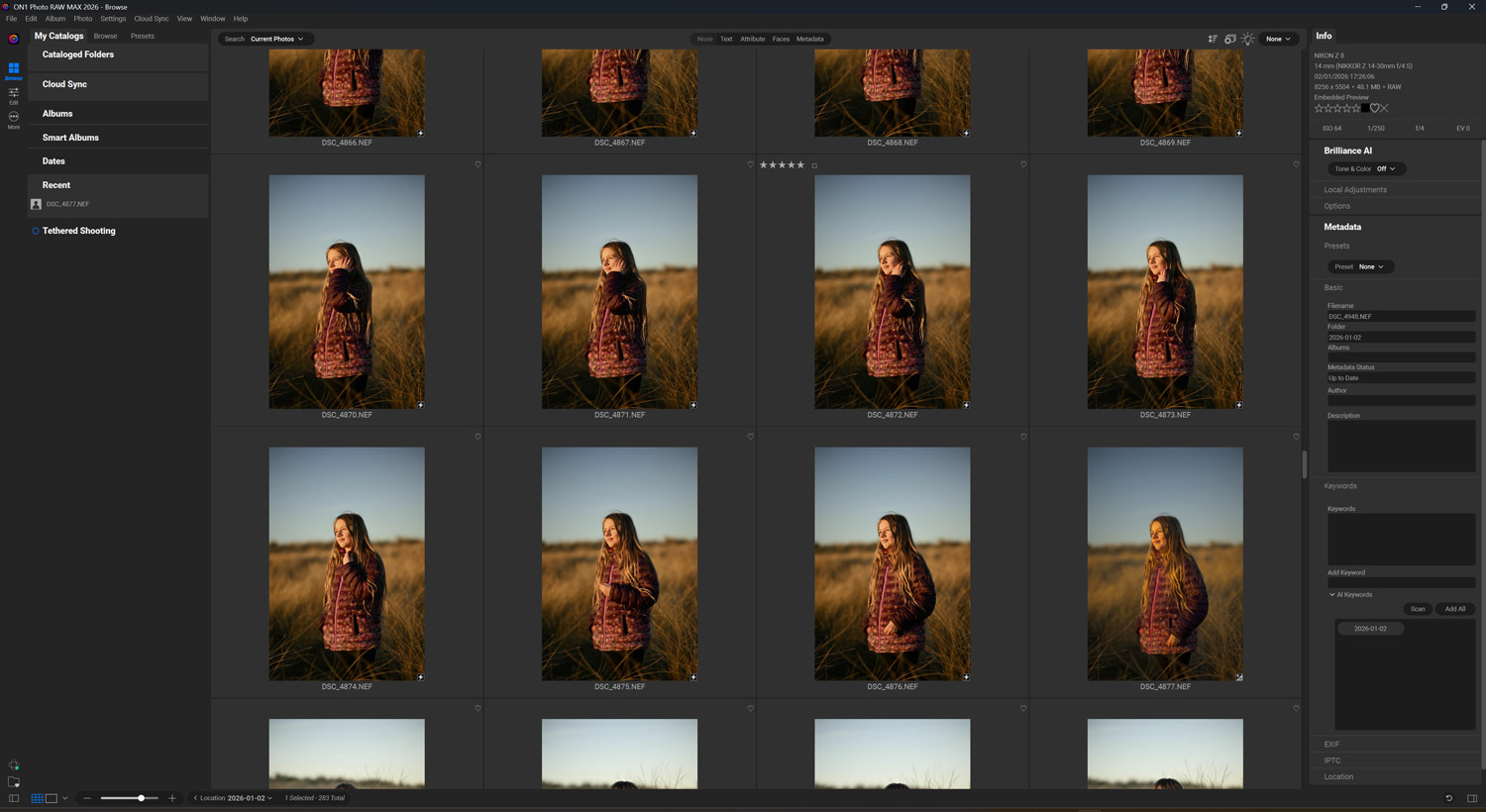
Right off the bat, ON1 Photo RAW 2026 feels noticeably snappier than its predecessor. The team at ON1 has clearly invested in performance optimization, and it shows. My RAW files from my Nikon Z8 (45.7MP) load quickly and applying adjustments feels more responsive than older versions. So well done, ON1.
The interface received a subtle refresh as well. It’s cleaner, more modern and honestly? I kind of like it.
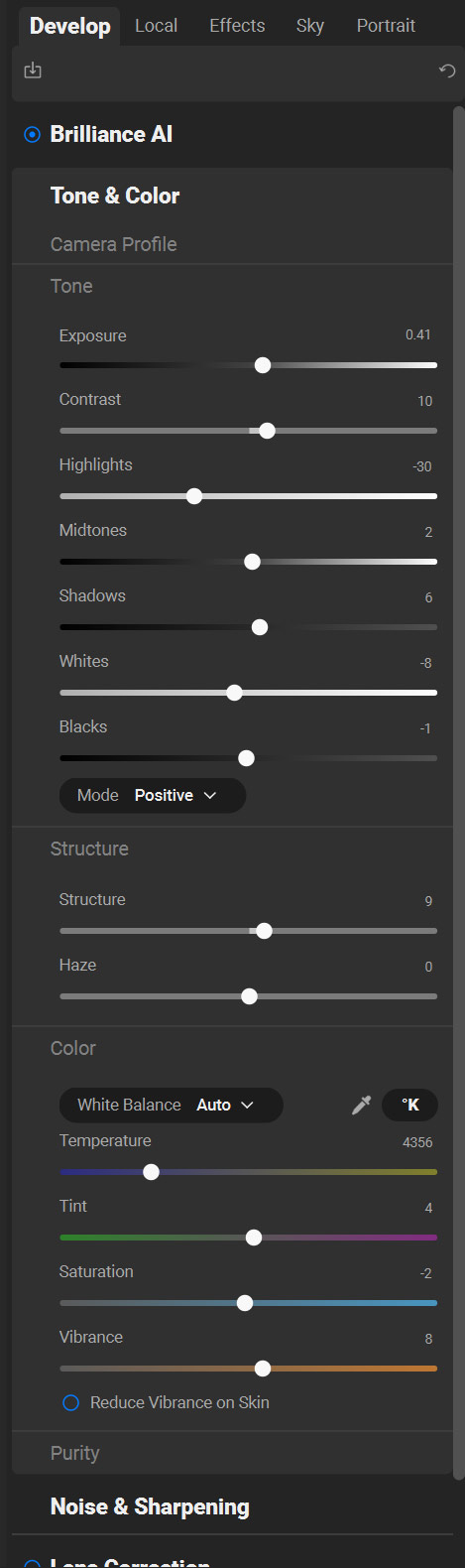
It’s very like the Lightroom classic control panel with all your standard exposure controls grouped together under the Tone and Colour section. With various other colour and structure controls.
So all your main image settings or controls are in one place. This all helps to make Photo Raw fairly intuitive after a few minutes use, especially if you’re coming from other editing platforms.
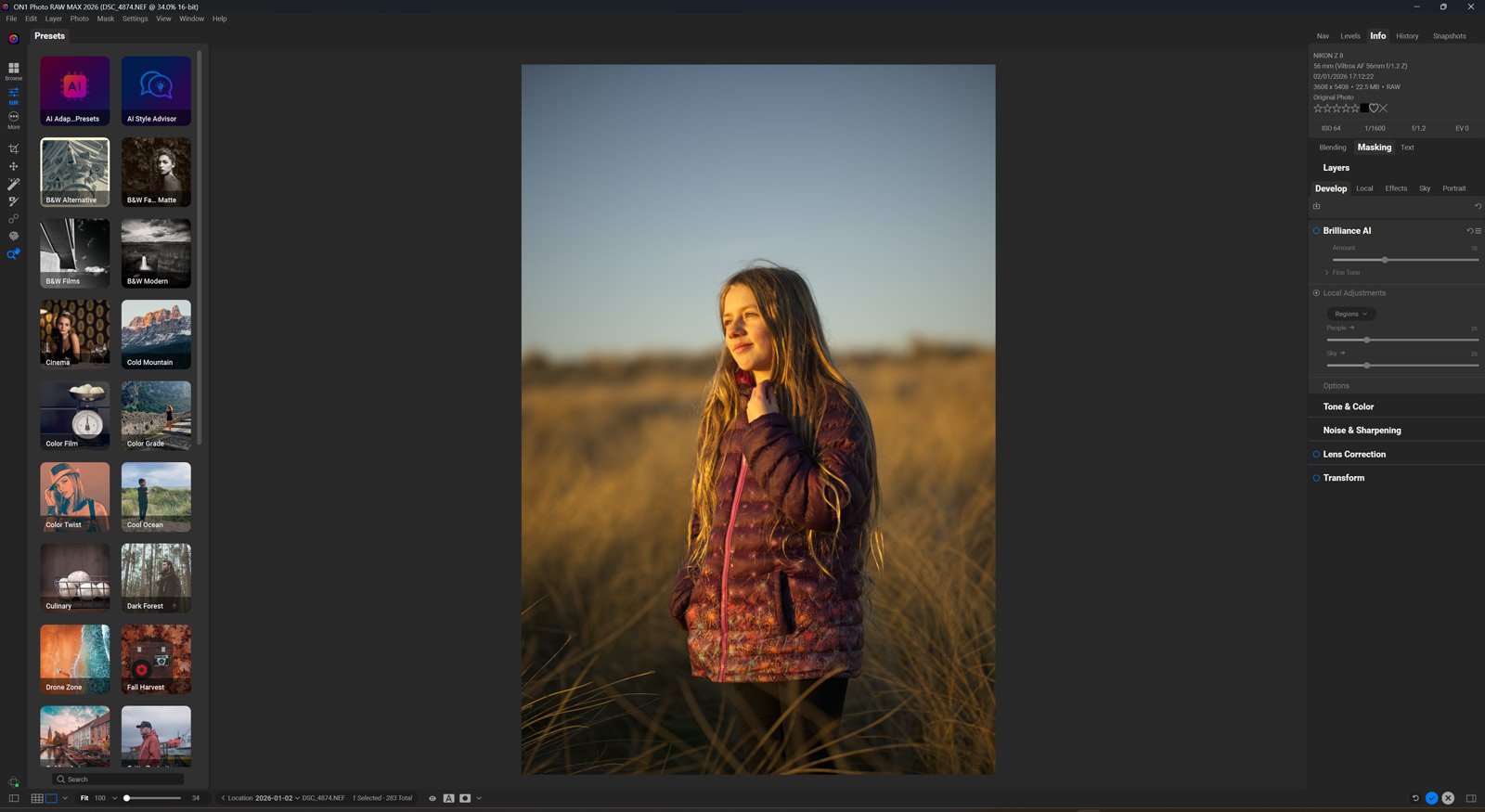
You can also see the Brilliance AI tab in the image which is something I will get to later on, but it’s basically an automated AI image editor and I find it useful for getting my basic adjustments right.
The learning curve isn’t nearly as steep as some competitors, though there’s still a moderate adjustment period for complete beginners.
Key Features That Actually Matter
AI-Powered Editing Tools
ON1 Photo RAW 2026 leans heavily into AI-assisted editing, and I have mixed feelings about this. The AI Quick Masking is legitimately impressive—it can isolate subjects with remarkably good accuracy. I’ve used it on everything from portraits to wildlife shots, and it has saved me serious time compared to manual masking.
The AI Match feature attempts to match colors and tones between images, which is handy for maintaining consistency across a shoot. However, it’s not perfect and sometimes needs manual tweaking. Future updates will hopefully refine this further.
Non-Destructive Editing Power
This is where ON1 Photo RAW 2026 really shines. Every single adjustment you make is non-destructive and fully editable. You can stack effects, blend them with different modes, and mask anything your heart desires. The layer-based editing system gives you Photoshop-level control without the complexity of… well, Photoshop.
Brilliance AI
Local Adjustments and Masking
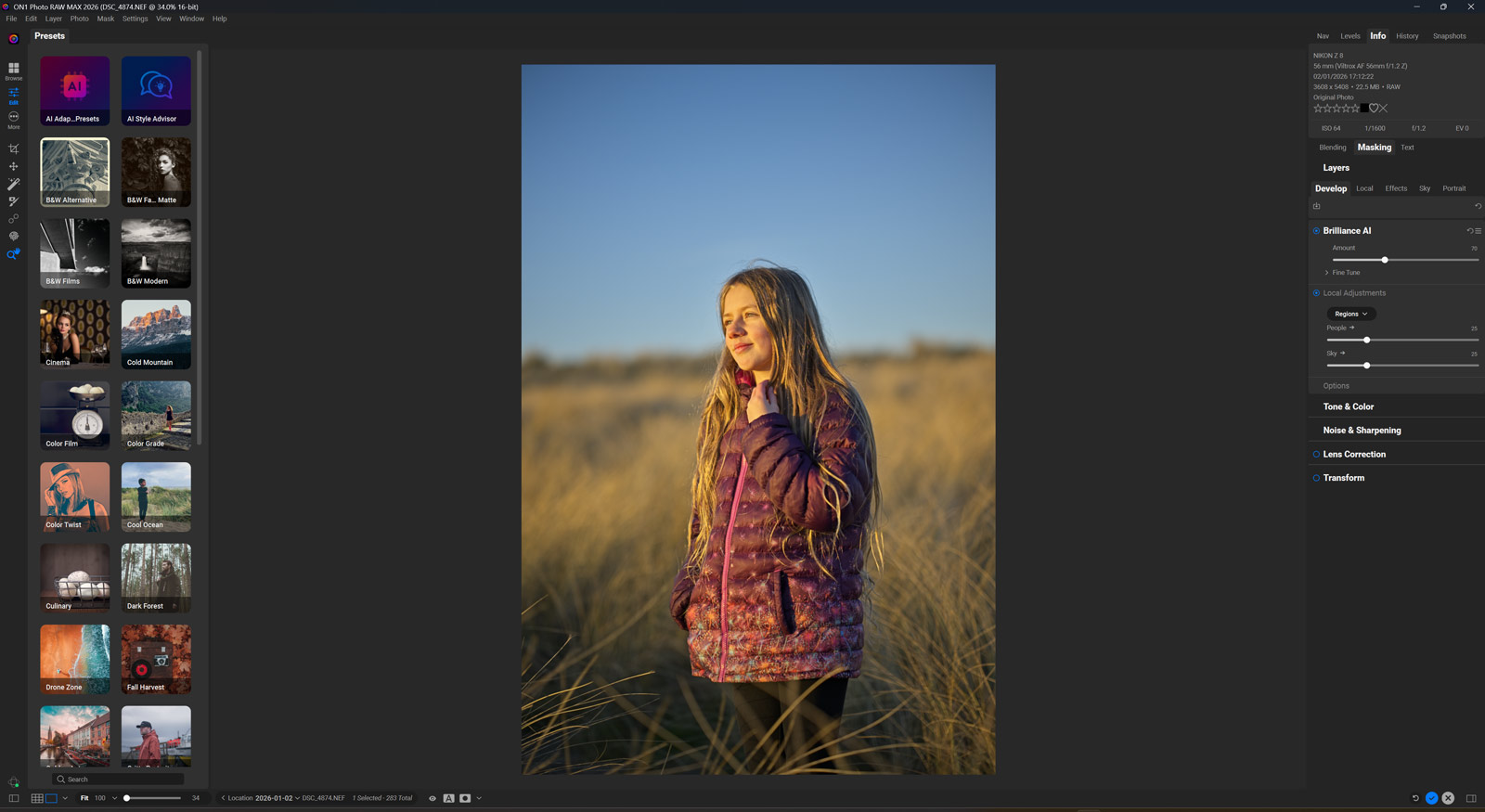
The local adjustment tools are robust. You get all the usual suspects—brushes, gradients, radial masks—but the integration with the AI masking tools elevates them. I particularly love the Luminosity Masking options, which are fantastic for landscape work.
Effects and Presets
ON1 Photo RAW 2026 comes loaded with effects and presets. Some are genuinely useful, while others are… well, let’s call them “Instagram circa 2012.” The good news? You can create and save your own presets, and there’s a decent community sharing custom looks.
Portrait Retouching
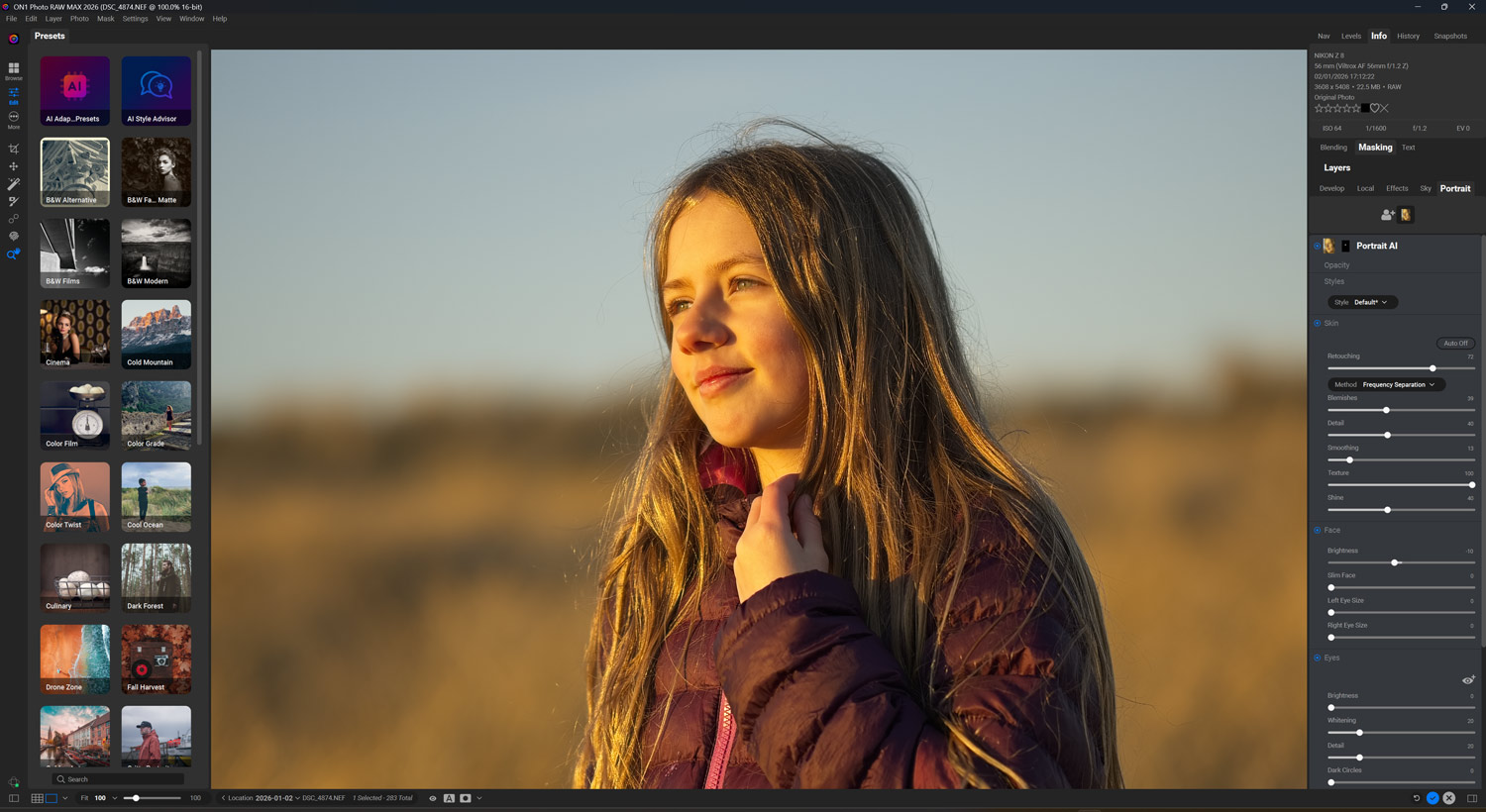
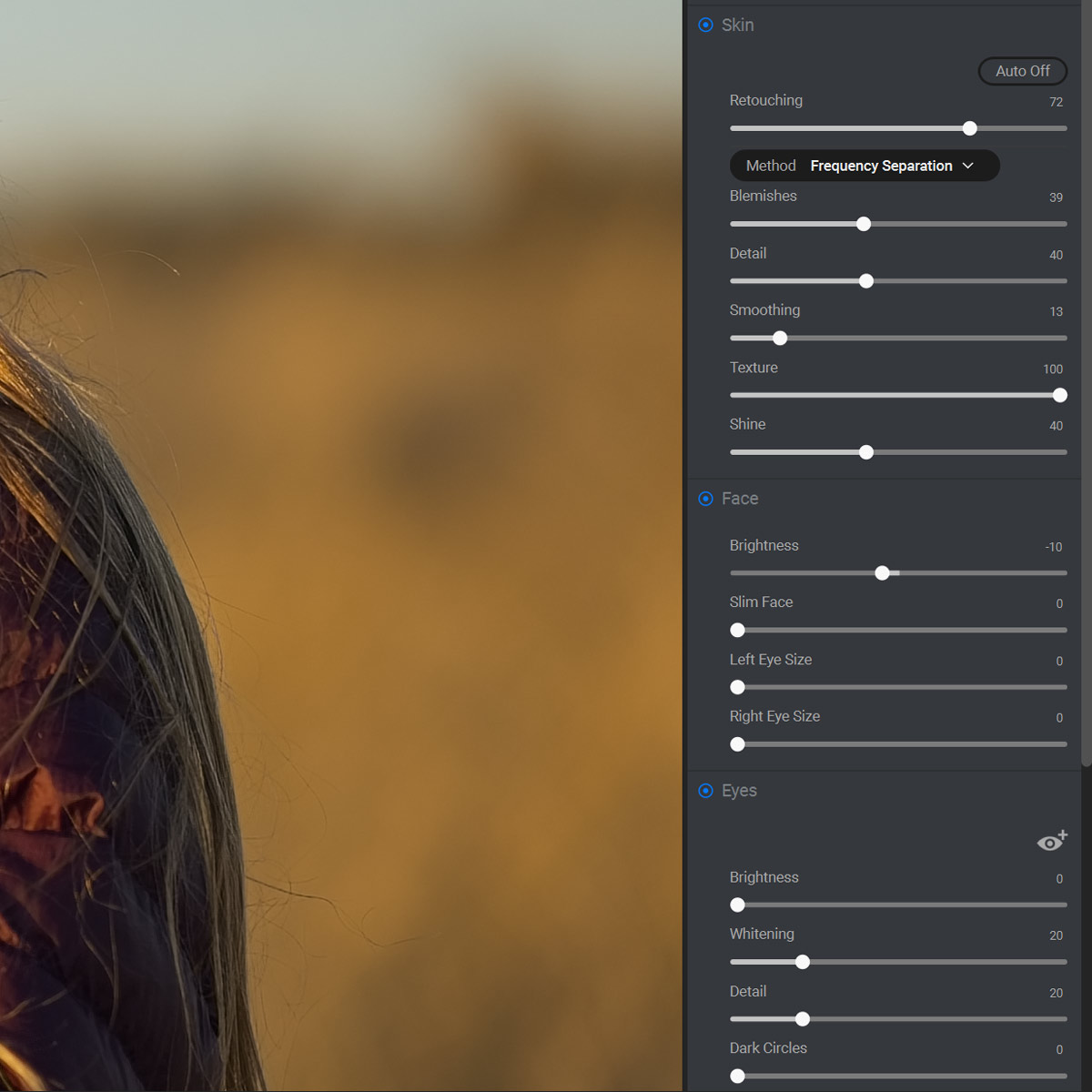
The portrait module has improved significantly. Skin retouching looks more natural than previous versions, and face detection works reliably. It’s not quite at Photoshop or Skylum’s Aperty level with Frequency Separation, but for 80% of portrait work, it’s more than adequate.
Click on the images below to see them full screen.
What ON1 Photo RAW 2026 Does Well
Organization and Cataloging: The Browse module is legit. Fast searching, good facial recognition, and the ability to organize without moving files around on your hard drive. Coming from Lightroom? The transition is surprisingly smooth.
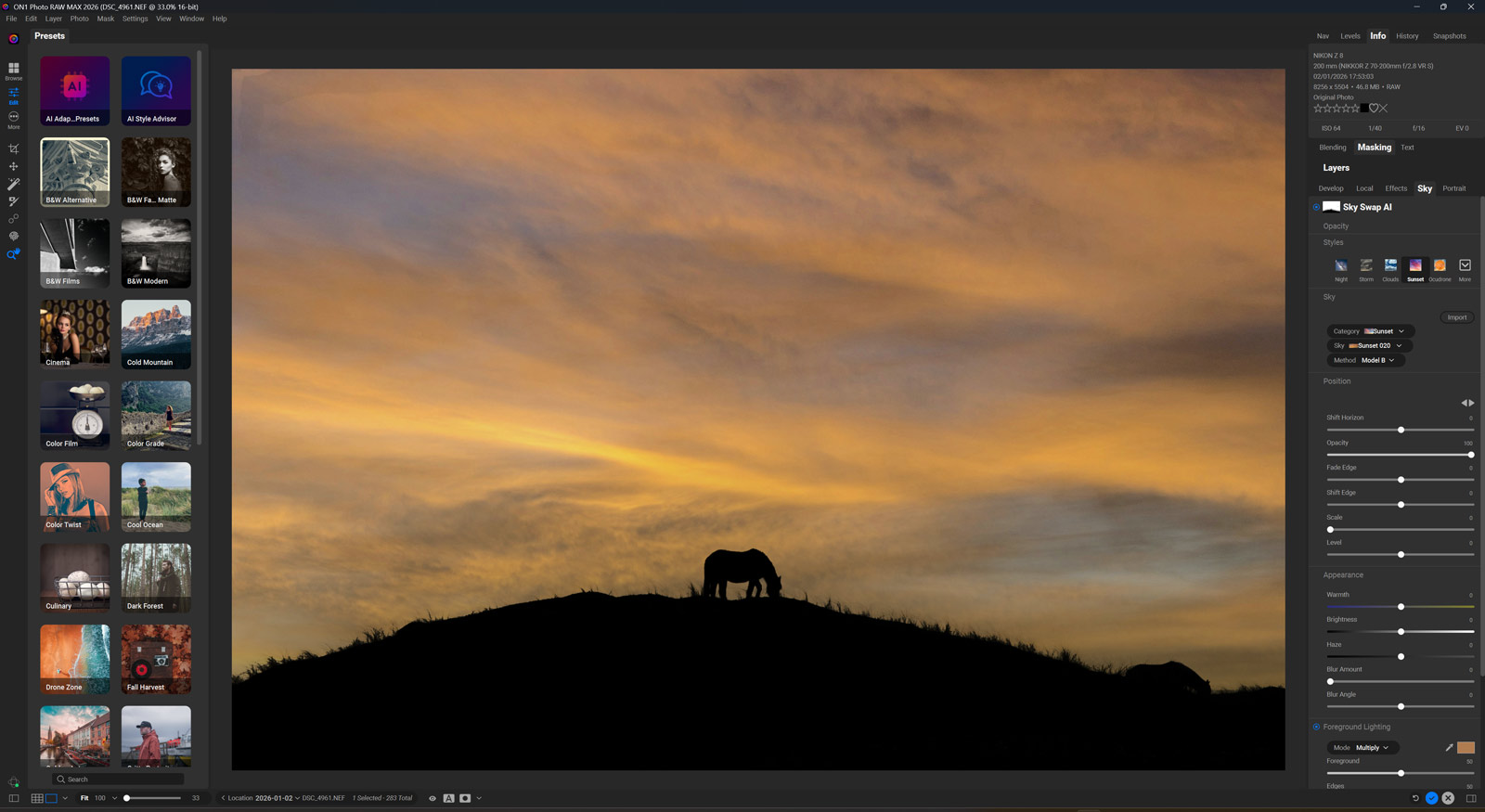
Sky Replacement: I know, I know—sky replacement is controversial. But sometimes you need it, and ON1’s implementation is actually quite good. The masking is clean, and blending options give you control over how natural it looks.

Batch Processing: Need to edit 500 wedding photos? The batch processing capabilities are solid. Apply presets, adjust settings across multiple images, and export in various formats simultaneously.
Standalone Software: No subscription required. You buy it, you own it. In 2026, that’s increasingly rare and refreshing.
Plugin Integration: Works seamlessly as a plugin for Lightroom or Photoshop if you’re not ready to fully commit.
Where ON1 Photo RAW 2026 Falls Short
Let’s keep it real—nothing’s perfect, and ON1 has some rough edges.
1. Shadow Slider Bleed: The shadow adjustment slider affects midtones and highlights more than it should. When editing a landscape and boosting shadow detail (like a backlit tree or rock), the slider also impacts the brighter parts of the image, not just the shadows. This requires additional masking or adjustment layers to correct, which is easy enough but I would hope they would fix this glitch soon.
2. Learning Curve: While improved, there’s still a moderate learning curve. The sheer number of options and adjustment layers can be overwhelming initially. YouTube tutorials are your friend here.
3. Occasional Stability Issues: I’ve experienced a few crashes over my testing period—about 3 crashes over a 30 hour period of use. These crashes occurred usually when working with complex edits and large catalogs (1,000+ images). The auto-save feature is handy as it helps minimize lost work, but manual saves are still recommended. I didn’t lose significant work in any instance, but the interruption can be frustrating.
4. Color Science: This is subjective, but I find ON1’s default color rendering slightly less pleasing than Lightroom’s straight out of the gate. It takes some profile adjustments to get skin tones where I want them, particularly with warmer skin tones under mixed lighting.
5. Limited Third-Party Plugin Support: Compared to Photoshop’s ecosystem, the plugin options are sparse. If your workflow depends heavily on third-party tools like Nik Collection or specialized sharpening plugins, this could be limiting.
6. Mobile Experience: The mobile app exists, but it’s not nearly as polished as Lightroom Mobile. If you do significant editing on iPad or want cloud sync between devices, this might be a dealbreaker.

Performance: The Nitty-Gritty
System Specs for Testing:
- MacBook Pro M2 Max, 32GB RAM
- Windows 11 Desktop, i9-13900K, 64GB RAM, RTX 4080
ON1 Photo RAW 2026 runs well on both systems. The Mac version feels slightly more optimized, which makes sense given the M-series chip architecture. On Windows, GPU acceleration works great, but RAM usage can climb to 8-12GB with large projects open.
Export speeds are competitive. A batch of 100 RAW files (45MP) to high-quality JPEGs takes about 4-5 minutes on the Mac and 5-6 minutes on Windows, which is respectable.
Catalog Performance: I tested with catalogs ranging from 500 to 5,000 images. Performance remained smooth up to about 2,000 images. Beyond that, initial catalog loading takes 10-15 seconds, and searches slow down slightly. For catalogs exceeding 10,000 images, consider breaking them into separate catalogs by year or project.
Who Should Buy ON1 Photo RAW 2026?
This software is perfect for:
- Photographers tired of subscription models
- Enthusiasts wanting professional-grade tools without Photoshop complexity
- Landscape and portrait photographers who need robust local adjustment tools
- Anyone wanting an all-in-one solution for organization and editing
Maybe look elsewhere if:
- You require cutting-edge color science right out of camera
- Your workflow is heavily plugin-dependent
- You need rock-solid stability for mission-critical work
- Mobile editing is a core part of your process
Comparison to the Competition
vs. Adobe Lightroom Classic
Lightroom still has superior color science and a more mature ecosystem. However, ON1 Photo RAW 2026 offers more creative effects out of the box and doesn’t require a subscription. The organizational tools are comparable, with Lightroom having a slight edge in polish and cloud integration.
vs. Capture One
Capture One is the professional’s choice for tethered shooting and color accuracy. It’s also significantly more expensive. ON1 is more user-friendly and better for photographers who want creative effects integrated into their workflow without the steep learning curve.
vs. DxO PhotoLab
DxO wins on pure image quality and lens correction. ON1 wins on creative flexibility and the breadth of tools available. They target slightly different markets—DxO for the technically-minded photographer, ON1 for the creative-first shooter.
vs. Luminar Neo
These two are the closest competitors. Luminar Neo (review here) is slightly more AI-focused with flashier features like AI Sky Enhancer and Atmosphere. ON1 Photo RAW 2026 is more comprehensive for traditional editing workflows and offers better organizational tools. Both are good options; your choice depends on whether you want AI magic or traditional control.
I should also mention I have a Luminar Neo discount code here also to save you a nice bit of money
| Feature | ON1 | Lightroom | Capture One | Luminar | DxO |
|---|---|---|---|---|---|
| No Subscription | ✓ | ✗ | ✓ | ✓ | ✓ |
| AI Features | Good | Good | Limited | Excellent | Limited |
| Mobile App Quality | Fair | Excellent | Good | Fair | None |
| Layer-Based Editing | ✓ | ✗ | ✓ | ✓ | ✗ |
| Color Science | Good | Excellent | Excellent | Good | Excellent |
Tips for Getting Started with ON1 Photo RAW 2026
Take the Tutorial: ON1 offers excellent tutorials. Watch them. You’ll save yourself hours of frustration and learn the software’s logic faster.
Start with Presets: Use the included presets as starting points, then adjust to your taste. This helps you learn what different tools do without starting from scratch.
Master Layers Early: The layer system is powerful. Invest time understanding it early, and you’ll unlock the software’s full potential.
Customize Your Workspace: You can rearrange panels and modules. Set it up for your workflow, not theirs.
Use Keyboard Shortcuts: Learning even a few shortcuts dramatically speeds up your editing. Start with the basics like copying adjustments (Cmd/Ctrl+C) and pasting them to other images (Cmd/Ctrl+V).
Additional Considerations
Update and Upgrade Policy
ON1 releases a new major version annually (2027, 2028, etc.). When ON1 Photo Raw 2027 launches, you can continue using 2026 indefinitely—it won’t stop working. However, you won’t receive new features or support for newer camera RAW files. Upgrade pricing is typically $79.99, which is reasonable for annual updates. Many users upgrade every other year to save money while staying relatively current.
File Format Support
ON1 Photo RAW 2026 supports a comprehensive range of file formats:
- RAW files from all major camera manufacturers (Canon, Nikon, Sony, Fujifilm, Panasonic, Olympus, Pentax, Leica, Phase One, and more)
- JPEG, PNG, TIFF (8-bit and 16-bit)
- PSD (Photoshop files with layers)
- DNG (Adobe’s open RAW format)
- HEIC (with macOS Big Sur or later / Windows with codec installed)

Final Verdict: Should You Buy ON1 Photo RAW 2026?
Here’s my bottom line as a working pro: ON1 Photo RAW 2026 is a solid, capable photo editor that delivers genuine value, especially if you’re allergic to subscriptions.
Is it perfect? No. Does it completely replace Adobe for professional work? For some photographers, yes. For others, probably not quite yet. But it’s closer than ever before, and the gap continues to narrow with each release.
For hobbyists and enthusiasts, this is an easy recommendation. You get professional-grade tools at a one-time price that won’t break the bank. For pros, it depends on your specific workflow and needs, but it’s absolutely worth a trial.
The 2026 version represents meaningful improvements over previous iterations. ON1 is listening to feedback and making smart decisions about where to invest development resources.
If you are thinking about making the purchase then don’t forget to use my ON1 Discount Code below
20% off ON1 Promo CodePros and Cons Summary
✓ Pros
- No subscription model—pay once, own forever
- Comprehensive all-in-one solution
- Powerful non-destructive editing with layers
- Excellent local adjustment tools
- Good AI-assisted features that actually save time
- Strong batch processing capabilities
- Works as standalone or plugin
- Regular updates and improvements
✗ Cons
- Occasional stability issues (3-4 crashes in 40+ hours of testing)
- Moderate learning curve for beginners
- Color science not quite on par with Lightroom or Capture One
- Limited third-party plugin ecosystem
- Mobile experience needs significant work
- Can be resource-intensive with large projects
My Rating Breakdown
Each category is rated out of 5 stars:
| Features | 4.5/5 |
| Performance | 4.0/5 |
| User Interface | 4.2/5 |
| Value | 4.6/5 |
| Reliability | 3.9/5 |
| Overall Rating | 4.3/5 Stars |
Why Reliability Is Scored Lower: The 3.9/5 reliability rating reflects the occasional crashes I experienced during testing (approximately 3 crashes over approx 30 hours of intensive use). While the crashes were infrequent and never resulted in data loss thankfully.
For professional work where uninterrupted editing is critical, this is worth noting. The stability has improved significantly from earlier versions, but it’s not yet at the rock-solid level of Lightroom Classic or Capture One.
Bottom Line
ON1 Photo RAW 2026 is a mature, capable editing solution that’s genuinely competitive with the big names. It’s not perfect, but it’s very good, and the no-subscription model makes it an increasingly attractive option in our subscription-saturated world.
If you’ve been curious about alternatives to Adobe, this is the year to give ON1 a serious look. Download the trial, put it through its paces with your real work, and see if it clicks with your workflow.
Thanks for reading this review! Feel free to check out my Luminar Neo review for another excellent Lightroom alternative.
See you out there,
Kieran
Frequently Asked Questions
Can ON1 Photo RAW 2026 replace Lightroom completely?
For many photographers, yes. It handles organization, RAW processing, and editing in one package. However, if you’re heavily invested in Adobe’s ecosystem (presets, plugins, cloud sync), the transition requires some adjustment. The mobile experience is also weaker than Lightroom Mobile.
How does RAW processing compare to Adobe Camera Raw?
It’s good, but Adobe still has a slight edge in default color rendering, particularly for skin tones. ON1 continues to improve with each version, and for most users, the difference is minimal after some profile customization.
Does it work with my camera’s RAW files?
ON1 Photo RAW 2026 supports RAW files from virtually all major camera manufacturers including Canon, Nikon, Sony, Fujifilm, Panasonic, Olympus, Pentax, and Leica. Check ON1’s website for your specific camera model to confirm support.
Is the learning curve steep?
Moderate. If you’re familiar with Lightroom or Photoshop, you’ll adapt within a few days. Complete beginners will need some tutorial time—I recommend budgeting 4-6 hours with the included tutorials to feel comfortable.
Can I try before I buy?
Yes! ON1 offers a 30-day free trial with full functionality. I strongly recommend trying it with your actual workflow before purchasing to ensure it meets your needs.
What happens when ON1 Photo Raw 2027 comes out?
Your 2026 license continues working indefinitely. You won’t receive new features or support for newer camera RAW files, but the software doesn’t stop functioning. Upgrade pricing is typically around $79.99.
Can I open ON1 files in other software?
ON1 uses proprietary .ON1 sidecar files to store edits non-destructively. Your original RAW files remain untouched and can be opened in any RAW processor. However, the ON1 adjustments themselves won’t transfer to other software. You can export edited versions as TIFF, PSD, or JPEG to preserve your work.
ON1 Photo Raw 2026 Review - Is it worth it?

In this ON1 Photo Raw 2026 Review I run you through its features, how it works and if I think it's actually good value or not.
Product Currency: USD
Product Price: 79.99
Price Valid Until: 2026-12-31
Product In-Stock: InStock
4.3
Pros
- Great Value for money
- Fast Learning curve
- Plenty of features
- Great Catalog facility.
Cons
- Shadow slider is not great and it bleeds into midtones and highlights.